
Download Health Anywhere – virtual doctor, telehealth, remote medical care, video consultation, online doctor, virtual visit, health care app, medical consultation, virtual health, telemedicine
Overview
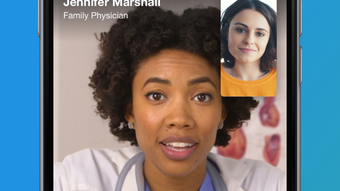
LGH Health Anywhere, developed by Lafayette General Health System Inc., is a desktop-based telehealth solution designed to provide 24/7 virtual medical care through video consultations. The software enables users to connect with licensed healthcare providers at any time, from any location, offering timely medical support for common health concerns such as colds, flu, allergies, sore throats, rashes, sinus infections, and fever. This service is particularly beneficial for individuals who face challenges accessing traditional in-person care due to time constraints, travel limitations, or nighttime symptoms.
Target users include adults seeking convenient, secure, and immediate medical attention without visiting a clinic. The platform supports both web and mobile access, with the desktop application offering a stable interface for users who prefer larger screens and more reliable connectivity. Integration with Apple Health allows users to share real-time health metrics such as heart rate, blood pressure, body temperature, blood glucose levels, weight, and respiratory rate during consultations, enhancing the provider’s ability to assess conditions accurately.
The software is not intended to replace in-person medical care or address emergency situations, and users are advised to contact emergency services immediately in urgent cases. The service complements existing healthcare routines by offering flexibility and accessibility, making it ideal for remote work, travel, or overnight symptom management.
Key Features & Capabilities
- 24/7 Virtual Video Consultations – Access licensed medical providers at any hour, day or night, without scheduling appointments or waiting in clinics.
- Common Ailment Support – Receive medical evaluation and guidance for non-emergency conditions including colds, flu, allergies, sore throat, rash, sinus infection, and fever.
- Secure Health Data Sharing – Integrate with Apple Health to share real-time health metrics such as heart rate, blood pressure, body temperature, blood glucose, weight, and respiratory rate during visits.
- Prescription Management – Providers can issue digital prescriptions directly to the user’s preferred pharmacy, streamlining medication access.
- Online Payment Integration – Pay for services securely using a credit card through the platform’s built-in payment system.
- Multi-Platform Accessibility – Use the software via desktop (Windows, Mac) or mobile devices, ensuring consistent access across environments.
These features enable users to manage minor health issues efficiently, reduce unnecessary clinic visits, and maintain continuity in personal health monitoring. For example, a user experiencing a sudden fever during a late-night work session can initiate a consultation, share their temperature data from Apple Health, receive a diagnosis, and have a prescription sent to a pharmacy—all within minutes. The integration of health data and secure payment enhances the overall user experience and supports proactive health management.
User Interface, Workflow & Performance
The user interface of LGH Health Anywhere is designed for simplicity and accessibility, with a clean layout that guides users through appointment initiation, video connection, and post-visit actions. Navigation is straightforward, allowing users to start a consultation with minimal steps. The workflow begins with selecting a symptom category, followed by a brief health history input, and then connecting to a provider via video chat.
Performance is expected to be stable given the software’s size of 150 MB and its focus on real-time video communication. However, exact performance details such as CPU or RAM usage were not specified by the developer. Users may experience variations in video quality depending on internet speed and device capabilities. The application does not appear to require high-end hardware, suggesting it is optimized for general desktop use.
Stability during video sessions is assumed to be reliable, as the platform is built for consistent telehealth delivery. No reported issues with crashes or session interruptions were provided. The developer did not specify resource usage details, but the software’s size and function suggest moderate resource consumption typical of video-based desktop applications.
Compatibility & System Requirements
LGH Health Anywhere is compatible with Windows and Mac operating systems, making it accessible to a broad user base across personal computing platforms. The software version is 1.0.1, indicating a stable release with minor updates and improvements. Installation size is 150 MB, which is relatively compact for a video-based medical application.
Exact system requirements were not listed by the developer. This includes details on minimum processor speed, RAM, available disk space, or video card specifications. The developer did not provide additional system requirements. As such, users are advised to ensure their devices meet standard desktop computing standards for video conferencing applications. Compatibility information is limited to OS support, with no confirmation of support for older or less common operating systems.
Pros and Cons
Pros
- 24/7 access to licensed medical providers for non-emergency care
- Integration with Apple Health for real-time health data sharing
- Secure online payment and prescription delivery
- Compact installation size (150 MB)
- Available on both Windows and Mac platforms
- Supports common health issues without in-person visits
Cons
- Not suitable for users under 18 years of age
- No emergency care support; users must call 911 in urgent situations
- Exact system requirements were not specified
- Does not support non-Apple health platforms
- Price of $24.99 may be considered high for occasional use
FAQ Section
Is LGH Health Anywhere available for all age groups?
The software is not intended for individuals under 18 years of age. It is designed for adult users seeking remote medical consultations.
Can I use this app without Apple Health?
Yes, you can use the app without Apple Health. However, the integration with Apple Health allows for enhanced medical evaluation through shared health data. Without it, you may need to manually report your symptoms and vitals.
Is the service secure and private?
Yes, the platform is designed to be secure and private, with encrypted video consultations and protected data handling. Users are advised to use trusted networks when accessing the service.
How often can I use the service?
There is no specified limit on the number of consultations. Users can access the service as needed for non-emergency medical concerns.
Do I need an internet connection to use Health Anywhere?
Yes, a stable internet connection is required to participate in video consultations and access all features of the software.
Final Thoughts
LGH Health Anywhere offers a reliable, accessible, and secure solution for adults seeking timely medical advice without the need for in-person visits. Its 24/7 availability, integration with Apple Health, and support for common ailments make it a valuable tool for managing everyday health concerns. While it does not replace in-person care or handle emergencies, it serves as a strong complement to traditional healthcare, especially for busy professionals, travelers, and those in remote locations.
Despite the lack of detailed system requirements and the exclusion of users under 18, the software’s clean interface, straightforward workflow, and multi-platform support enhance its usability. With a reasonable price point and a focus on privacy and convenience, LGH Health Anywhere stands out in the telehealth space.
Download Health Anywhere now







